
Key takeaways
Choose a CRM system email marketing setup that fits your budget, technical capacity, and need for customization. Govern the customer record, sender identity, and withdrawal path together. If your team works from a shared inbox, make ownership and workflow visibility part of the decision.
An email-marketing checkbox tells you very little about what happens after a message goes out. Your clinic still needs customer data to reach the right system, replies to reach the right person, and results to return to a useful record. That operating path matters more than a long feature list.
The practical choice is among three architectures: a CRM-and-email stack, a CRM connected to a specialist email platform, or an instrumented shared inbox. Each asks something different from your team. The right setup matches the flow of data, the staff handoff, the governance work, the reporting you need, and the implementation burden you can carry.
Which CRM system email marketing setup fits your clinic?
There is no useful answer based on a product name alone. The integration method should match your clinic's technical capacity, budget, and need for customization. A flexible connection may be attractive, but it still needs someone to define and maintain it. A simpler workflow may demand less customization while leaving more work with staff.
Set those three boundaries before a product demo. First, decide how much technical work your clinic can support. Then set the budget for the whole setup, not just the entry license. Finally, write down where customization is necessary and where a standard workflow is enough. This prevents a long feature list from hiding the work that comes with the chosen integration method. It also gives every option the same test. You are comparing the fit between the method and your clinic, not the size of each vendor's catalogue.
A med spa also has two jobs to account for. Its software must support clinical documentation and compliance obligations, while also serving the business demands of bookings, retention, and margins. That is why a general CRM for email marketing cannot be judged only by campaign tools. For the broader software stack around records, operations, and scheduling, our definition of practice-management software provides useful context.
Price the setup as an operating system, not as a single subscription. A medical-spa software evaluation should include subscriptions, add-ons, and processing rates in total monthly cost. Compare that total with the platform's contribution to bookings, retention, and revenue per visit. Those criteria do not produce a universal winner. They show whether the architecture fits the work your clinic needs it to do.
Three architectures solve different parts of the email workflow
The Email Continuity Decision Sheet below compares the three architectures on the same operating questions. It is a selection method, not a product ranking or a set of vendor scores.
| Architecture | Operating capability | Setup requirement | Scale limitation |
|---|---|---|---|
| CRM-and-email stack | CRM customer data can power messages instead of a static list. | Align people, connected processes, data movement, and data ownership. | As volume grows, observe whether people, processes, and governance remain aligned. |
| Connected specialist platform | An email service provider connected to Salesforce can exchange contact data and campaign engagement, automate list transfer, and return results. | Define use cases, field mappings, automation rules, and tests. | At higher volume, observe whether contact data, engagement, list transfer, and results still move between systems. |
| Instrumented Outlook inbox | Assignment, queues, service-level tracking, and analytics can add operational structure while the team remains in Outlook. | Add clear ownership, workflow visibility, and performance measurement. | A shared mailbox is not designed to scale on its own; missing ownership, visibility, and performance data become liabilities as volume and expectations grow. |
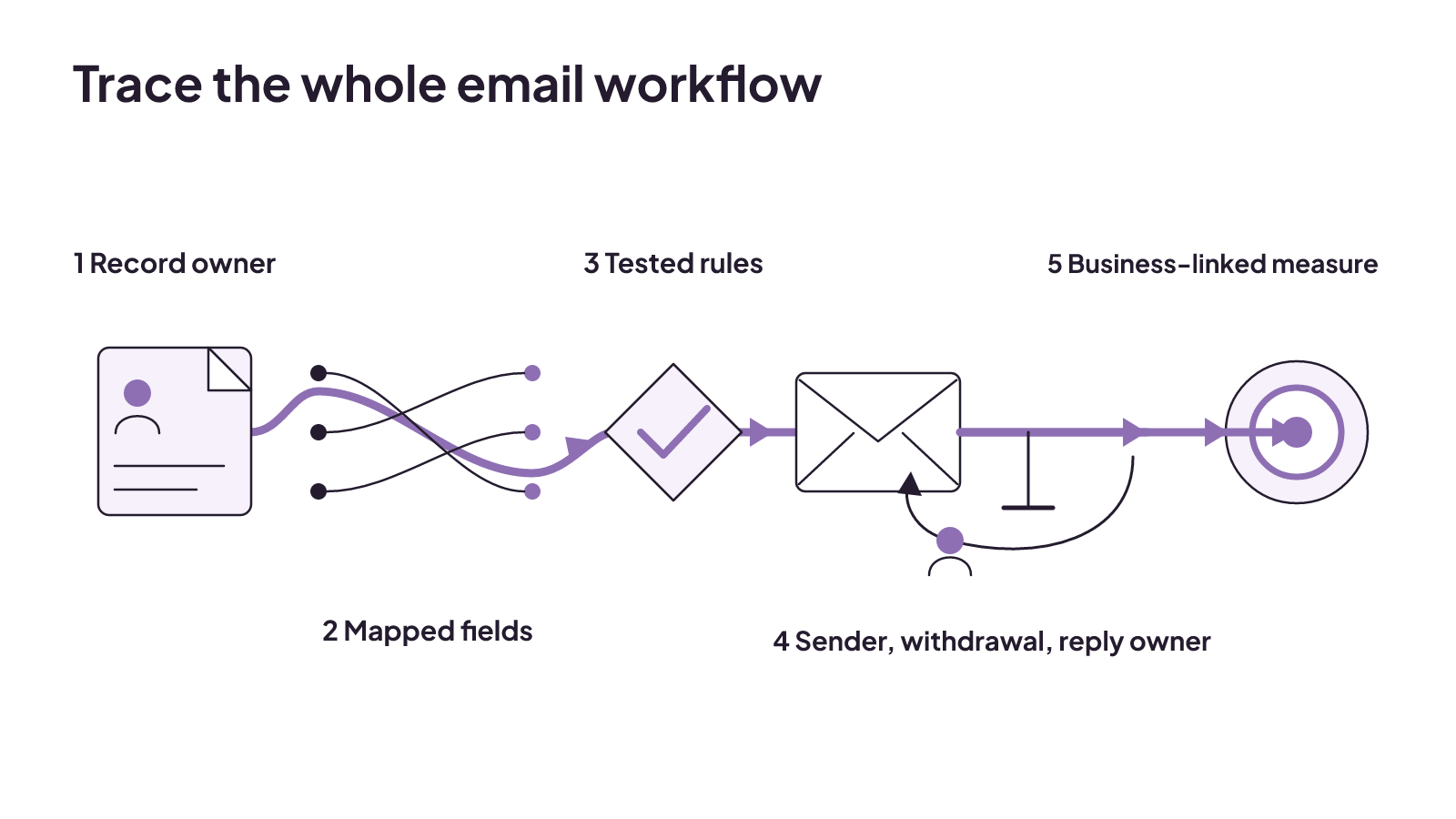
Record six observations while you test a shortlist:
- Who owns each customer record and each field?
- Which fields move between systems, and where are they mapped?
- Which automation rules are tested before use?
- Which sender identity appears, and how does the withdrawal path work?
- Who owns a reply, and what happens when the normal rule cannot handle it?
- Which reporting measure connects to a core business objective?
This sheet also keeps the comparison fair. An integrated stack should not win merely because it has more features. A connected platform should not win because it has a specialist campaign tool. An inbox should not win because it feels familiar. The deciding issue is whether the full operating path remains visible and owned.
Governance comes before patient email automation
Set the rules for the data before selecting or building the integration. Data ownership, field mapping, and quality standards establish which record controls the workflow and what information is fit to move. Without those decisions, automation can move a mismatch faster.
Use this six-point governance check:
- Data ownership: Name the system and role that own the customer record.
- Field mapping: Define how fields correspond when data moves between systems.
- Quality standards: Set the standard data must meet before it powers a workflow.
- Sender identity: Govern which identity sends each message.
- Withdrawal handling: Keep eligibility and the withdrawal path connected to the customer record and journey state.
- Patient-email safeguards: For email regulated by the Health Insurance Portability and Accountability Act, document patient preferences, strengthen encryption, distinguish required from addressable specifications, and sign a business associate agreement with the email provider.
Now trace one real send from beginning to end. The customer record should show the person's journey state and eligibility for the message. The workflow should identify the sender and preserve the withdrawal path. It should also make the outcome explainable. Keeping those parts together turns governance into an operating check: your team can see why the message was sent, which identity sent it, and what happened afterward. That is a stronger test than confirming that an automation switched on.
The patient-email point deserves care. Standard email lacks safeguards demanded by the Security Rule, so email is not compliant by default under that rule. Patient preferences and the required safeguards belong in the operating design, not in a final check after campaigns have been built.
Privacy also reaches beyond the software itself. A patient email sent to a work address may be seen by colleagues. A message on an unattended phone may be seen by family members. Those possibilities affect what your clinic places in email and how it governs the channel. This United States requirement does not establish the rules for Canadian clinics, so the worksheet should not be treated as a Canadian privacy standard.
Automation has to preserve the human handoff
Good automation does more than send on schedule. When it runs on clean CRM data, it can trigger messages from actual customer behaviour and life-cycle stage instead of sending the same broadcast to a generic list. The record provides the context, but your operating rules determine what happens when a person replies or falls outside the expected path.
For a clean handoff, connect four parts of the workflow: records, rules, ownership, and exception handling. CRM workflow automation improves shared-service handoffs when those parts travel across the operating flow together.
Test the handoff with two paths. On the normal path, follow the CRM record through the rule and into the assigned owner's work. On the exception path, use a reply the normal rule cannot handle and observe whether ownership remains visible. This does not require a promised outcome or a made-up patient scenario. It tests the operating parts that automation must connect. If the exception leaves the record, rule, or owner behind, the clinic has found a workflow gap before relying on the system.
Consider a routine follow-up email as a CRM email marketing example. The CRM record supplies the relevant behaviour or life-cycle stage. An automation rule determines whether a message is triggered. Ownership determines which staff member receives a reply. Exception handling covers the response that the normal rule cannot resolve. This is an operating model, not a promise that automation will produce a booking or another business outcome.
System-level execution can replace manual data entry. That removes one kind of handoff, but it does not remove staff ownership. The team still needs a visible answer to who holds the conversation once a person responds. CRM and email alignment can keep sales and marketing teams in sync and support a consistent customer experience across relationship stages. In a clinic, that means the people responsible for campaigns and the people responsible for replies should be working from connected records and rules.
You can apply the same test to automated appointment reminders: trace the record, the rule, the owner, and the exception instead of judging the workflow by the fact that a message was sent.
What do real CRM email examples look like?
Named products help only when the example stays attached to an exact capability. HubSpot Smart CRM offers a free shared inbox that brings messaging tools into one place for conversations with prospects and customers. Its shared inbox can also connect contacts automatically with the appropriate people on a team.
That is a useful example of inbox routing. It is not evidence that HubSpot provides every email-marketing function, sending limit, automation, segmentation, or reporting capability your clinic needs. The architecture worksheet still applies: observe the record, mapping, rule, sender, withdrawal path, owner, and reporting connection.
A connected specialist platform has a different account boundary. Campaign Monitor for Salesforce version 4.76 requires both a Campaign Monitor account and Salesforce Professional Edition or above. Those requirements are part of the setup, not an optional detail. They show why buyers need to check the full product combination behind an integration name.
Apply that account check to the shortlist in writing. Record the named product, version or edition, required accounts, and exact capability being evaluated. A product label by itself can blur those boundaries. A written record keeps a shared inbox example from becoming a claim about a complete email-marketing suite, and it keeps an integration example attached to the accounts it requires.
These two CRM email examples are deliberately narrow. One shows a free shared inbox and team routing. The other shows a named integration with two account requirements. Neither example supports a broad verdict on the complete vendor, current pricing, or suitability for a particular clinic. Use product documentation to refresh version, edition, account, and capability details before a purchase.
Price the workflow, not just the license
The cost of an inbox or integration can change with the number of users and the features included in a tier. Compare price with the functionality your team needs, then include the subscription, add-ons, and processing rates in the clinic's total monthly cost.
Staff work belongs in the buying decision even when it does not appear on the software invoice. A workflow with unclear ownership can leave replies without a visible owner. A connected platform requires mapping, rules, and tests. An inbox may need assignment, queues, service-level tracking, and analytics as expectations grow. These are different forms of implementation work, and the architecture you choose determines which work your team must carry.
For medical spas, automated reviews, rebooking, email marketing, and text-message marketing can turn a one-time visit into a recurring client. Evaluate those functions alongside their contribution to bookings, retention, and revenue per visit. Do not turn that possibility into a forecast. The decision is whether the setup supports the functions your clinic intends to operate and measure.
If the broader question is how CRM, booking, and follow-up fit into acquisition, compare the shortlist with our patient-acquisition software guide.
How do you keep the integration reliable after launch?
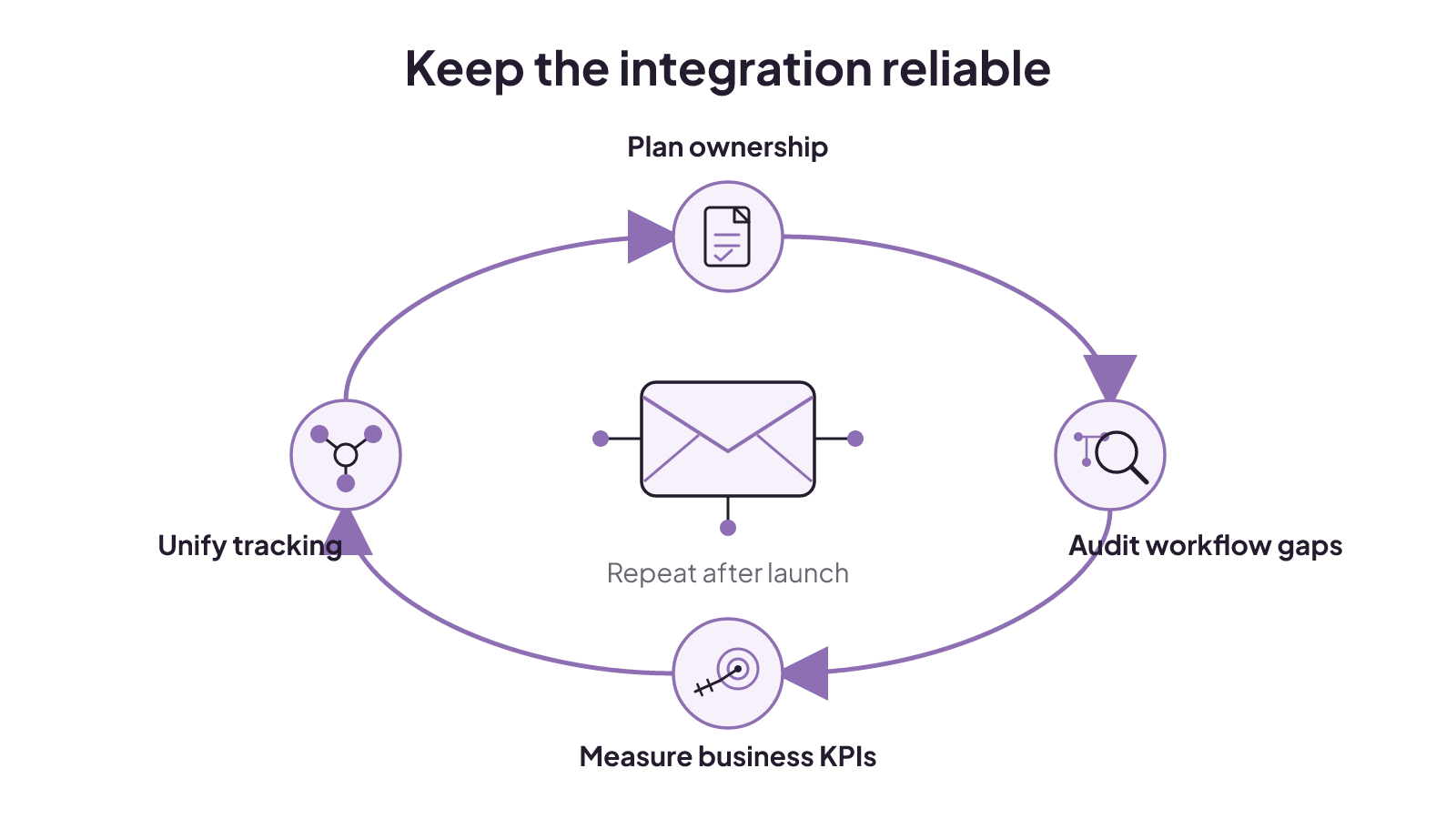
Treat launch as the start of an operating loop. Upfront planning and periodic audits can address field mismatches, over-automation, and compliance gaps in an email-marketing integration. The audit should return to the use cases, mappings, rules, tests, sender identity, withdrawal path, ownership, and exceptions already defined.
Reporting needs the same discipline. A key performance indicator is a metric tied directly to a core business objective. That definition keeps a campaign dashboard from becoming a pile of activity numbers. Choose the business objective first, then use the measure that directly represents it.
Unified tracking matters because data silos across platforms lead to inaccurate insights. When tracking is unified, the team gets a complete performance overview. For this workflow, that means reporting should preserve the connection among the customer record, campaign activity, replies, staff ownership, and the business objective.
Keep the audit tied to decisions your team can act on. A field mismatch points back to mapping and quality standards. Over-automation points back to the rule and its exception handling. A compliance gap points back to governance. An isolated metric points back to the business objective and the tracking connection. Periodic review is useful because each of those parts can be checked without turning the audit into a new software-selection project.
A practical review can stay focused on four checks:
- Plan: Confirm that the use case and ownership still match the clinic's operating flow.
- Audit: Look for field mismatches, over-automation, and compliance gaps.
- Measure: Tie each key performance indicator to a core business objective.
- Unify: Keep tracking connected across the platforms involved in the workflow.
The method has limits. It does not rank vendors, set pass-or-fail scores, or replace a current review of product versions, account requirements, privacy duties, and costs. It does give your team one consistent way to compare the work behind email marketing with CRM.
When your shortlist is ready, place it beside our patient-acquisition software guide. If the open gap is the booking and follow-up path itself, explore our patient booking systems and choose the next conversation that matches the work your clinic needs to connect.
How to build a marketing dashboard that helps your med spa decide what to do next
A med-spa marketing dashboard can connect funnel signals to metric owners, thresholds, diagnostic segments, and operational responses.
Read insight
ROI tracking: calculate the return and label what the number proves
ROI tracking is credible when every cost is counted and each result is labeled as observed, attributed, or experimentally incremental.
Read insight
Healthcare social media marketing: choose channels, controls, and handoffs
Healthcare social channels fit different patient needs; use a question-risk-handoff matrix to set review, response, and contact ownership.
Read insight