
Key takeaways
- Reminders confirm appointments that already exist. Recall and reactivation generate appointments.
- Reactivation starts after a former patient has been absent for a defined period.
- Unexpected replies can be missed or misclassified.
- Response rate tracks engagement. Completion rate tracks the intended next step.
Med spa rebooking automation starts with the patient state
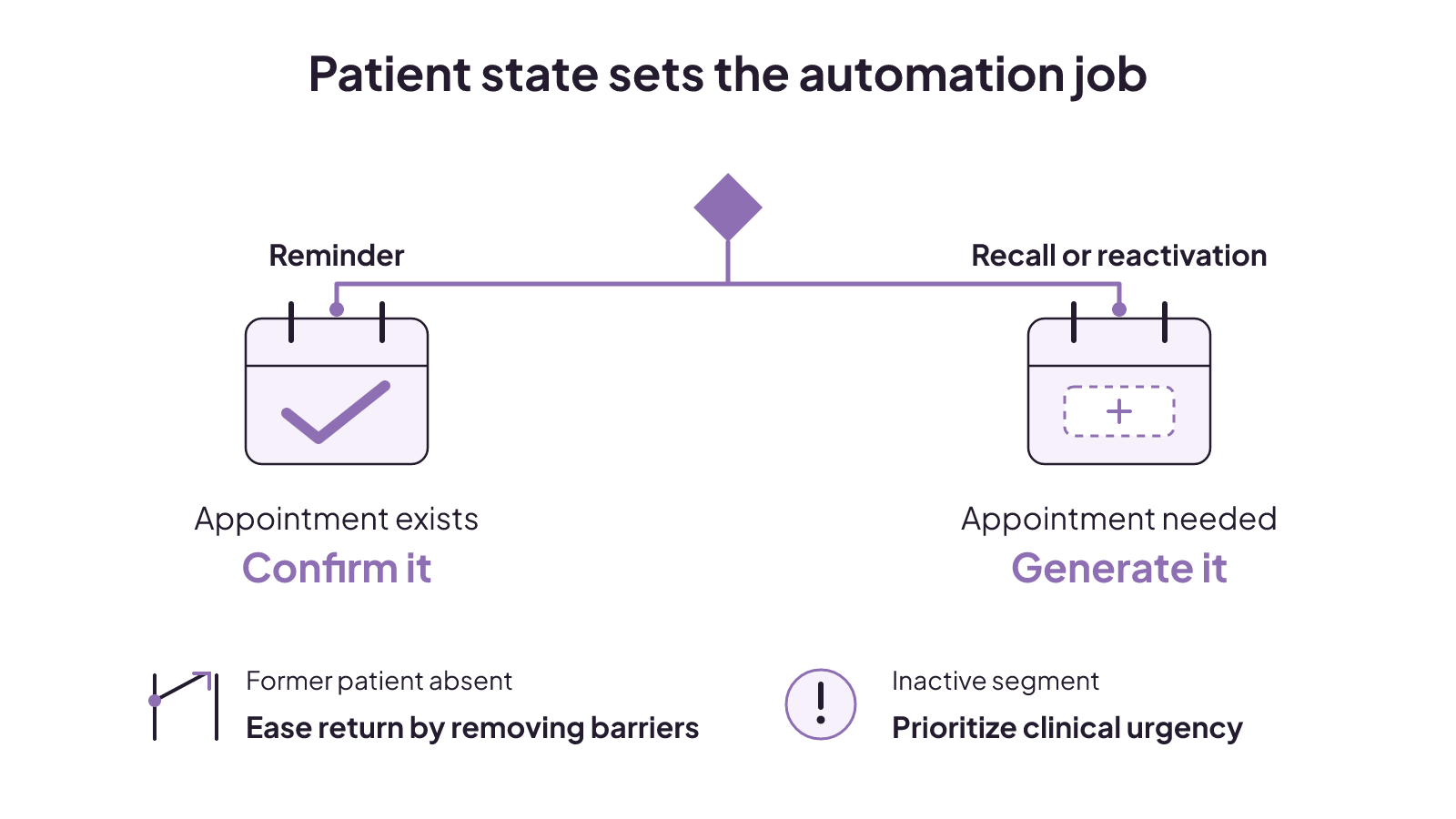
Start with the patient's current state. That choice determines whether the workflow confirms an appointment or needs to generate one.
| Starting state | What is true now | Workflow job or control |
|---|---|---|
| Reminder | The patient has an existing appointment | Confirm it, usually through the electronic health record or practice-management system |
| Recall or reactivation | An appointment still needs to be generated | Generate the appointment |
| Reactivation | A former patient has been absent for a defined period | Examine why the patient disengaged and make returning easy and comfortable |
| Inactive segment | The patient is inactive | Prioritize by clinical urgency and account for unresolved barriers |
Treating all inactive patients alike produces generic results. Reactivation can also fail when the original barrier remains when a patient tries to return. Thoughtful outreach examines the reason for disengagement and makes returning easy and comfortable. It avoids aggressive marketing and pressure.
Our automated appointment reminders glossary and patient reactivation guide give you short references for the two most easily confused jobs.
Even a well-defined state does not guarantee a tidy response. Patients can answer an automated message with needs that the original branch never anticipated.
What happens when a patient replies outside the script?
Unexpected replies are where a simple messaging flow can become an operating problem. Automated workflows can use triggers, keyword responses, branching logic, and escalation paths. Those tools can organize expected replies. They can also reveal the limits of what the system recognizes.
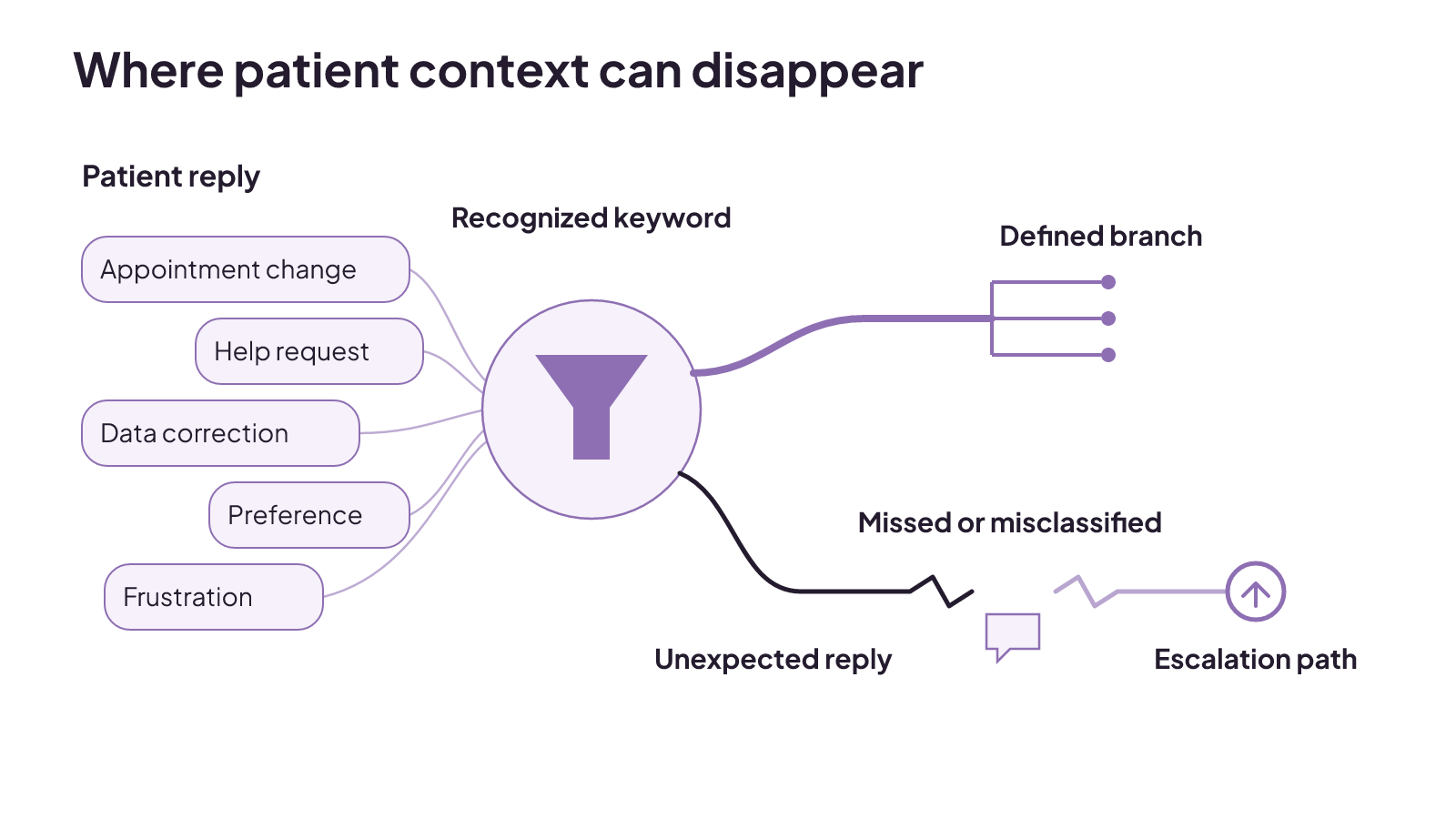
Some automated text systems recognize only a limited range of answers. An unexpected reply may be ignored or sorted into the wrong category. That can create an accidental opt-out or leave a patient's need unaddressed.
An analysis of 743 unique patient text responses within one integrated health system found eight response domains:
- Opt-out or opt-in requests
- Appointment management
- Help or information requests
- Communication preferences
- Corrections to inaccurate data
- Usefulness and usability comments
- Frustration
- Responses that could not be interpreted
Patients in that analysis were not simply replying yes or no. They tried to manage appointments, request information, correct inaccurate details, state communication preferences, and express frustration. Their replies reflected an expectation of two-way communication. They also exposed inaccurate patient information and usability barriers.
For an operator, reply handling belongs in the workflow design, not at the edge of it. A rebooking app should show how it recognizes expected keywords, where branching logic leads, and which replies enter an escalation path. The observed replies included appointment changes, information requests, data corrections, preferences, frustration, and messages the system could not interpret.
Recognition and escalation solve different parts of the workflow. Trigger rules and keywords can classify an expected response. Branching logic can move that response through a defined path. Escalation paths give the workflow another destination. None of those building blocks changes the finding that an unexpected reply may still be disregarded or misclassified.
This creates several concrete questions for a product demonstration. What does the system recognize? What happens to a reply it cannot interpret? Can a patient correction be kept separate from an opt-out request? The answers show how that tool handles response recognition.
The tradeoff is straightforward. Automation can organize routine branches, but limited response recognition can lose context. A send count cannot tell you whether those replies were understood. That is why channel choice and two-way communication need to be considered together.
Patient retention automation can combine several outreach channels
Patient retention automation is broader than text reminders. Text-message marketing, email campaigns, memberships, retargeting, and events are all used for patient retention and engagement. Each channel gives the clinic another way to maintain a relationship, but the presence of several channels does not remove the need to understand the people receiving the outreach.
Population understanding and personalization shape the outreach itself. App-less, secure two-way communication can reduce friction and improve operational efficiency when it is paired with an understanding of the patient population and personalized outreach. That matters when a reply contains a request or correction that does not fit a fixed response menu.
You can turn those facts into a focused channel review. Identify the patient population for the workflow. Decide where personalization belongs. Then check whether the communication is secure, works without requiring an app, and supports two-way exchange. Those questions are more useful than counting channels in a feature list.
Channel count and patient fit are different buying concerns. Five available channels do not describe who should receive a campaign or how personal the message will be. Population understanding and personalization address that part of the work. Secure two-way communication addresses whether the patient can answer without adding an app.
This also keeps patient retention automation from becoming a pile of disconnected sends. A channel can be part of the retention mix while the audience and reply path still need their own definitions. Text, email, memberships, retargeting, and events name the available strategies. They do not replace the patient-state decision that separates a reminder from reactivation.
The channel still needs software underneath it. Before comparing rebooking features, identify which software layer is supposed to own the work.
Choose the software layer before comparing features
Do not compare every product as if it solves the same clinic problem. Med spa software spans three categories, and each one owns a different part of the operation:
- Electronic medical record or practice-management systems handle clinical records and documentation.
- Booking platforms handle calendars, scheduling, and point of sale.
- Customer relationship management or marketing systems handle lead capture, follow-up automation, patient communication, campaigns, and attribution.
A med spa rebooking automation app may therefore sit in a different layer from the system holding the clinical record. Reminder functions are usually found in the electronic health record or practice-management layer. Follow-up automation, campaigns, and attribution sit within the customer relationship management or marketing category.
The category label alone is not enough. Medical spa software must support clinical documentation and compliance obligations as well as bookings, retention, and margins. The balance will look different across clinics. Leading options have different advantages for different practice sizes and needs.
You can narrow a product search by naming the missing job in ordinary language. If the gap is clinical records and documentation, compare the systems built for that layer. If it is calendars, scheduling, or point of sale, compare booking platforms. If it is lead capture, campaigns, patient communication, follow-up automation, or attribution, compare customer relationship management or marketing systems.
That distinction prevents one familiar feature from deciding the whole purchase. Evaluate campaign attribution separately from built-in reminders. Evaluate clinical documentation separately from campaign features. The three software categories describe different operating responsibilities.
That is a better starting point than looking for one universally preferred tool. Name the layer you need, then compare products within that job. If the main gap is the path from inquiry through follow-up, review our patient booking systems for med spas as part of that operational decision.
Once the layer is clear, feature comparison becomes much more useful. The app still needs to pass baseline requirements and show that it can carry the workflow through to a measurable result.
What should a rebooking app prove before you buy?
A med spa rebooking automation app should first pass the requirements that make it usable for your clinic. For U.S. clinics, HIPAA compliance and a signed business associate agreement are baseline criteria, not meaningful product differentiators. Passing that baseline does not prove that a tool can handle your leads, replies, follow-up, or reporting.
Use a compact buying gate:
- Patient data: Can the system support HIPAA scrutiny with a signed business associate agreement?
- Lead handling: Can it centralize leads?
- Initial response: Can it respond automatically within minutes?
- Follow-up: Can it continue following up until booking?
- Attribution: Can it attribute campaigns?
- Economics: How does total monthly cost compare with its contribution to bookings, retention, and revenue per visit?
Communication rules need their own place in the review. The Telephone Consumer Protection Act prohibits some unsolicited consumer communication. It includes a healthcare-messaging exemption, but providers still have to follow the exemption's guidelines. The existence of an exemption is not a reason to skip that boundary when evaluating an outreach workflow.
The baseline and the workflow demonstration answer different questions. HIPAA scrutiny and a signed business associate agreement address a U.S. buying requirement. The remaining gates address what the product does with leads, response speed, continued follow-up, campaign attribution, and cost. A tool needs more than a compliance label to show that it can carry a rebooking job.
After those gates, cost becomes an operating question instead of a sticker-price contest. Total monthly cost should be weighed against contribution to bookings, retention, and revenue per visit. A lower monthly bill does not answer whether the system follows up until booking or attributes campaigns. A longer feature list does not answer that question either.
Ask the vendor to demonstrate each gate against the workflow you intend to run. A reminder flow needs to confirm an appointment. Recall and reactivation need to generate one. Reply handling needs to account for messages beyond a fixed keyword menu. Reporting needs to separate patient engagement from the completed next step.
Keep the demonstration specific. Can a lead enter one central place? Can the first automated response happen within minutes? Can follow-up continue until booking? Can the reporting attribute the campaign? Those questions come directly from the buying checklist. They give you observable product behavior to compare without pretending one app is best for every clinic size or need.
Measure response and completed next steps
Response rate and follow-up completion rate answer different operating questions. Response rate measures how often patients engage with a communication workflow. Follow-up completion rate measures how often the workflow ends with its intended next step completed.
For a reminder, the intended next step is confirmation of an existing appointment. For recall or reactivation, the workflow job is to generate an appointment. The completion measure should match that job. A reply shows engagement, but engagement alone does not say whether the intended next step happened.
Azara DRVS offers a concrete product example of how those measures can be built into outreach. Azara Patient Outreach uses patient information already contained and curated in Azara DRVS to target outreach for its users. Its pre-configured programs can initiate contact by text, track responses and follow-up actions, adjust outreach, and quantify results. The product also lets staff focus personal outreach on patients who do not respond to automated campaigns.
That example is useful because it keeps several operating events visible: who entered the outreach, whether the patient responded, which follow-up action occurred, and whether the intended result was completed. It also separates automated outreach from personal contact with nonresponders. These are product-specific capabilities, not a claim that every rebooking app handles measurement or handoff the same way.
The targeting step in this example uses patient information already held and curated within Azara DRVS. Contact starts by text. The program can then track a response and the follow-up action, adjust outreach, and quantify results. Patients who remain unengaged can become the focus of personal outreach by staff.
When you review reporting, start with two plain questions. How often did patients engage? How often did the intended next step happen? Then check whether the system tracks the responses and follow-up actions needed to answer both.
If you want to connect patient communication, follow-up, recall, reactivation, and reporting around your existing clinic workflows, see our AI transformation work for aesthetic clinics. You can also review our patient booking and follow-up systems to decide where the workflow should live.
Marketing vs advertising: what comes first and where each fits
Marketing sets the strategy, while advertising pays to distribute messages, so goals and customer needs determine what you fund first.
Read insight
Digital marketing for lead generation: find where the lead path breaks
Digital lead generation moves the right audience from a specific action through qualification, follow-up, and downstream measurement.
Read insight
SEO vs GEO: search rankings and AI visibility use different scoreboards
Search rankings and AI visibility need separate scoreboards, with AI inclusion, citation share, positioning, and prompt stability tracked directly.
Read insight