

Key takeaways
- Lead routing assigns each inbound lead to a person, team, or queue using defined rules.
- Document ownership, exceptions, fallbacks, and reporting before choosing software.
- Automate clear cases. Give ambiguous or valuable leads a named triage owner, a response SLA, and monthly review.
Lead routing is the ownership side of an inbound workflow. It decides who receives an inquiry and where exceptions go. Speed to lead covers how quickly that inquiry receives a response. Both matter, but they answer different operating questions. A practical lead routing 101 starts with the assignment decision, not a software shortlist.
What does lead routing mean?
Lead routing software automatically assigns inbound leads according to predefined rules. The destination can be a sales representative, an account owner, a team, or a queue. For B2B revenue teams, software can make that assignment in real time.
For a med spa or aesthetic clinic, the useful question is simple: when a new inquiry enters your healthcare CRM, who owns it? A rule may send it directly to one person. It may instead place the lead with a team or queue that still needs a clear owner.
Routing is not the reply itself. It is the assignment that makes a reply someone's responsibility. That distinction helps when you investigate a slow or missed follow-up. First find out whether the lead reached the correct owner. Then examine how quickly that owner acted.
Lead routing algorithms encode operational judgment
A lead routing algorithm repeats decisions your team has already made. Those decisions include which teams receive which leads, what fair distribution means, and which ambiguous or valuable leads should not be left to automation. The rule may run automatically, but the judgment inside it still belongs to the business.
That is why automation alone is not a quality signal. Automating a bad routing decision makes the mistake faster and more consistent. As the routing system grows, weak logic can create overlapping territories, dropped handoffs, and leads left idle.
A durable routing system needs clarity, automation, fairness, and visibility. The rules should fire automatically, distribute leads equitably, and expose useful metrics. These elements work together only when the ownership decisions are clear. Fairness, for example, has to mean something specific for your team before software can apply it.
A lead can move somewhere while nobody who can work it has clear responsibility. The design therefore needs both the expected route and a route for anything that does not match cleanly.
Design the route before choosing the tool
Before comparing native CRM tools with added routing automation, document your lead sources, ownership rules, routing logic, fallback paths, and reporting needs. A hybrid routing pattern can automate clear-cut leads while sending exceptions to a triage queue with a named owner and response SLA. Review routing performance monthly.
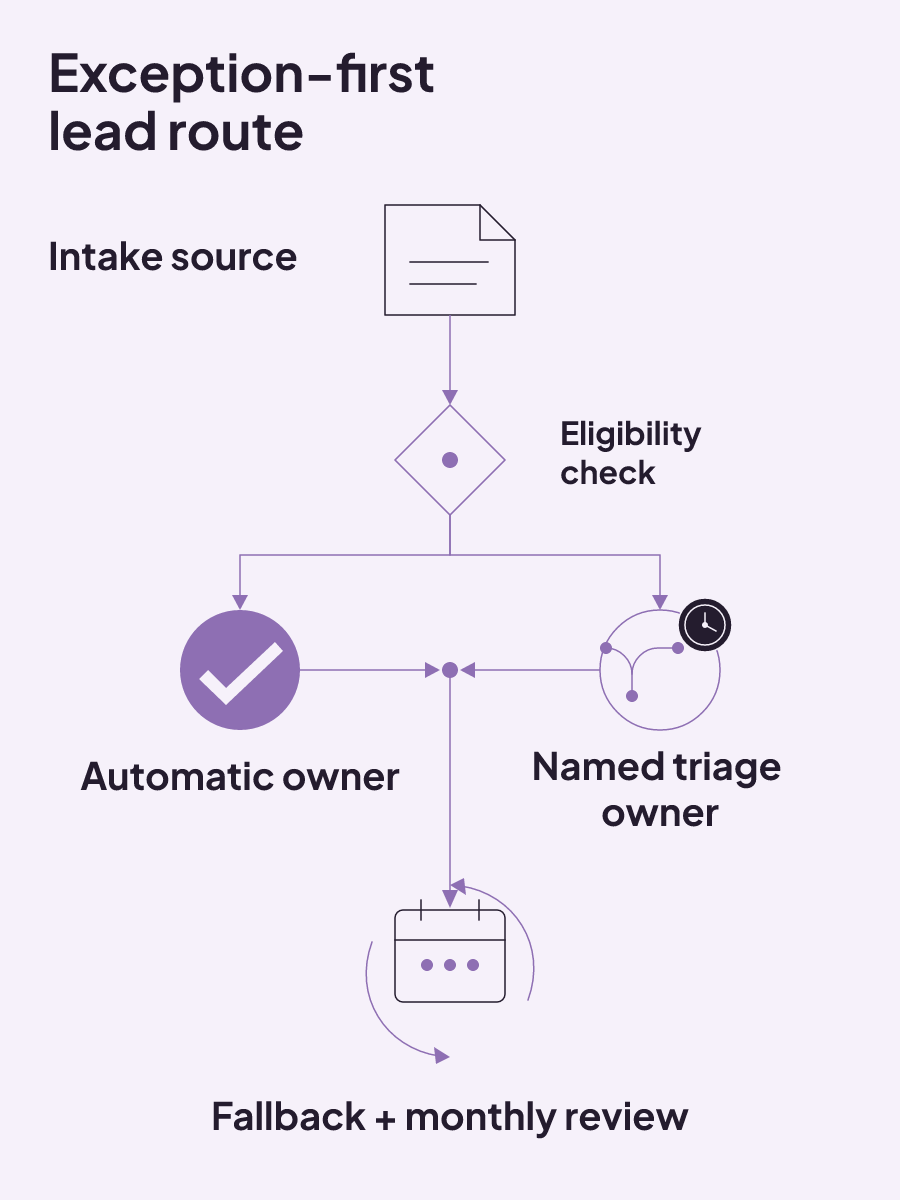
Use this exception-first routing canvas for one intake path at a time:
| Decision | Automatic path | Exception path | Ownership or review signal |
|---|---|---|---|
| Intake source | Which documented source enters the route? | Where does an unanticipated source go? | Who reviews source gaps? |
| Eligibility | Which clear criteria allow automatic assignment? | Where does an ambiguous or valuable lead go? | Who owns the eligibility decision? |
| Owner pool | Which eligible people or teams can receive the lead? | Who handles a lead with no eligible owner? | Who maintains the pool? |
| Fairness or capacity | How should eligible leads be distributed? | Where does a lead go when capacity criteria are not met? | Which distribution signal is reviewed? |
| Exception handling | Which leads enter the triage queue? | Who is the named triage owner? | What response SLA applies? |
| Fallback or review | Which fallback receives an unmatched or stalled lead? | How is the stalled lead redistributed? | Who reviews routing performance monthly? |
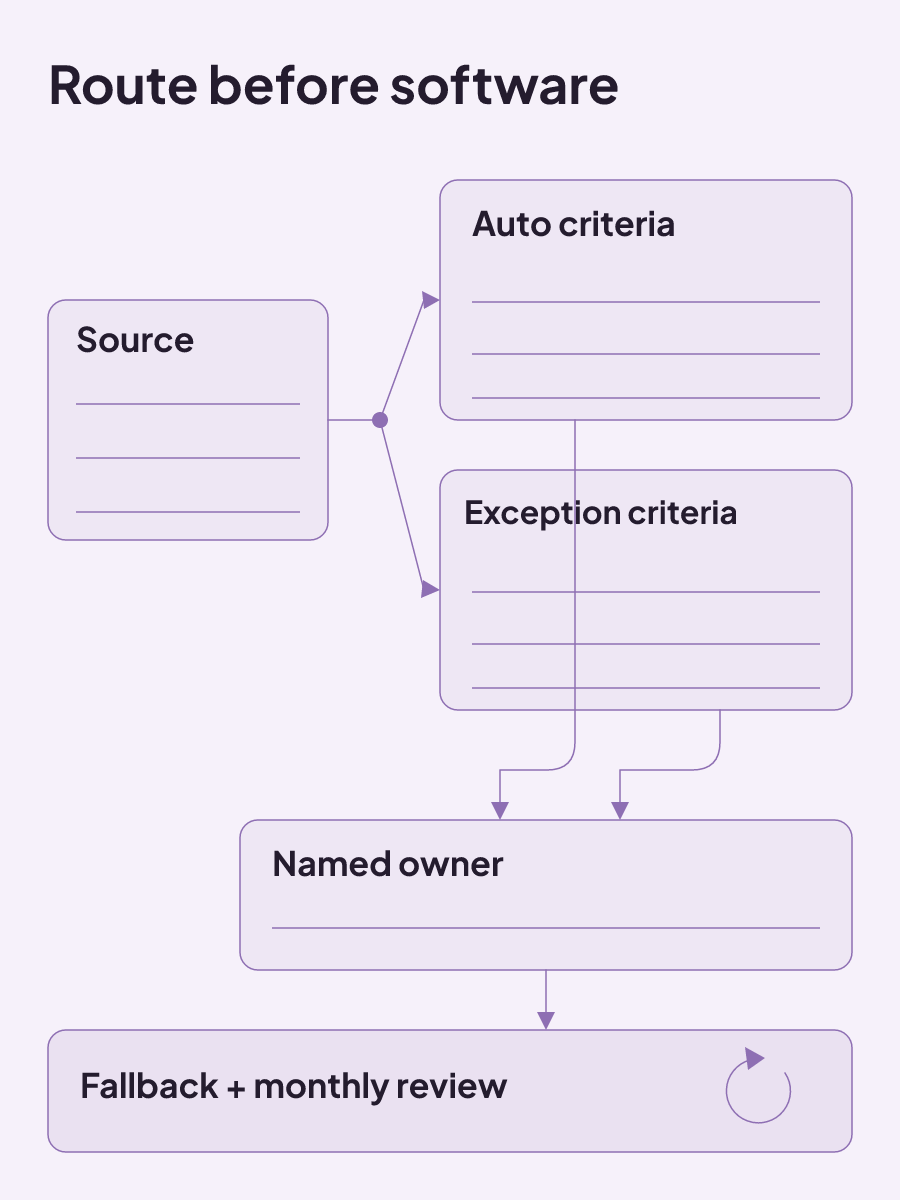
When does round-robin routing fit?
Round-robin routing fits when your fairness goal is an equal number of leads for each representative over time. That equal-distribution function is the foundation. It does not settle who should enter the rotation or whether every lead belongs there.
Define the eligibility criteria first. Then name the representatives in the rotation pool, along with the business hours and time-zone rules that govern entry. These choices establish which leads and people take part before the rotation begins.
Round robin can also use more than a simple turn-taking sequence. Even distribution can be combined with availability checks, capacity limits, lead-scoring thresholds, and territory rules. Territory logic, skill matching, and AI-based optimization can be layered onto the same foundation while keeping its equity and automation functions.
That is the useful boundary for AI lead routing here. AI-based optimization can be one layer, but it does not remove the need to define eligibility, ownership, hours, capacity, or exceptions. The routing design still has to say what happens when a lead cannot follow the automatic path.
Choose the layers that match the decisions on your canvas. A clinic that needs equal distribution is making one decision. Availability, territory, skills, and capacity add other criteria that must be defined on their own terms.
A lead routing example: test one source before expanding
A contained round-robin pilot can route one lead source among 2-3 representatives for two weeks. Keep the existing process running in parallel and collect feedback every day before expanding the new route.
The single-source boundary makes the test concrete. Lead capture can come from website and landing-page forms, advertising platforms, trade shows and events, webinar registrations, or purchased lists. The capture point used for the pilot should connect to the CRM so the route can operate on the selected source.
Review the round-robin performance dashboard weekly and adjust the route from the observed data. Daily feedback and weekly dashboard review serve different purposes during the same pilot: one records what the representatives encounter, while the other reviews routing performance.
Representatives also need training on how round robin works, how to manage assigned leads, and which escalation path to use when something goes wrong. Revisit that training after a significant routing change. Expansion should follow the pilot and its feedback, not come before them.
How should automatic lead routing handle exceptions?
Automatic lead routing works best when the business decisions come first. Decide which teams receive which leads, what fair distribution means, and which ambiguous or valuable leads should move to a triage queue. The triage queue needs a named owner and response SLA, so an exception does not become an unowned lead.
The automatic path also needs fallback logic. Set the skill and capacity criteria, name where a stalled lead goes, and define how it will be redistributed. Review routing performance each month to catch gaps between the route you designed and the assignments the system produces. Those checks include the fallback logic, the skill and capacity criteria, and the redistribution path for a lead that has stalled.
This is why the exception path belongs beside the automatic path on the routing canvas. A clean match can move without manual review. An unmatched or stalled lead still has a destination, an owner, and a review signal. Those decisions need to be clear before you ask software to repeat them.
Capacity and round robin need explicit rules
Round robin distributes an equal number of leads to each representative over time. Before you configure it, define the eligibility criteria, the people in the rotation pool, business hours, and time-zone rules. Those boundaries decide which leads enter the rotation and which representatives can receive them.
Availability checks, capacity limits, lead-scoring thresholds, and territory rules can be added to even distribution. Territory logic, skill matching, and AI-based optimization can also sit on that foundation. Each added layer should match a decision already recorded on the routing canvas.
Fallback logic still matters when a lead does not meet the skill or capacity criteria, or when a routed lead stalls. Name the fallback destination, the person responsible for reviewing it, and the signal that triggers redistribution. The software should execute those choices, not make them on your behalf.
Five metrics expose silent routing failures
Routing failures can stay quiet while leads sit in queues, land with default owners, or reach representatives who cannot work them.
A routing audit can examine five metrics: assignment-to-first-touch time, distribution parity, default-owner rate, rule-bypass frequency, and SLA-breach rate. Together, these measures show whether assignment is followed by action, whether distribution matches the intended fairness rule, and how often leads escape the planned route.
Use the metrics to investigate the failure state they reveal. A higher default-owner rate points attention toward unmatched criteria. Rule-bypass frequency draws attention to owner changes after the initial route. SLA-breach rate shows where the named response commitment is not being met. This routing audit approach makes failures visible before another layer of automation is added.
Why do leads fall into default queues?
Default-owner and catch-all assignments often reveal that a lead did not match the expected criteria. The gap may come from missing field values, outdated rule criteria, or an unanticipated lead source. Broken routing can also come from stale user assignments or logic that was not updated after a territory change.
Start with a report of leads assigned to the default owner or queue. Cross-reference those leads with the field values evaluated by the assignment rules. This method connects the unexpected destination to the criteria that were supposed to produce an owner.
If a routing field is blank, compare that missing value with the relevant rule entry. If values are present, examine whether the criteria are outdated or the intake source was never anticipated. Then check whether user assignments are stale or a territory change occurred without a matching logic update.
This is a logic investigation, not proof that the default queue itself is broken. The catch-all is exposing leads that did not follow the intended path. Once the unmatched field or outdated rule is visible, you can revise the route and continue tracking the default-owner rate.
Frequent reassignments are a routing signal
Repeated manual reassignment means the routing output does not match the team's expectations. The rules may be misconfigured, or they may be too simple for the current process. Either way, people are correcting the automatic assignment after it fires.
Measure that behavior through Lead Owner change history. Filter for leads whose owner changed within the first 24 hours after creation. That produces a concrete view of early owner changes instead of relying on anecdotal reports that leads keep going to the wrong person.
The timing matters because this measure is specifically about changes during the first 24 hours. Review the affected leads against the criteria, owner pool, and exception path used at creation. Frequent changes can then inform whether the rule needs correction or whether the process now requires more detailed logic.
How should you choose lead routing software?
The best lead routing software question becomes useful when you turn it into a fit test. Can the software run your documented sources, ownership rules, routing logic, fallback paths, and reporting needs? Test that answer with real data in the demonstration.
Look beyond the license price. CRM total cost of ownership includes implementation, data migration, integrations, paid add-ons, support tiers, internal administration, training, and change management. Estimate those costs across at least three years so renewals and scaling needs are part of the comparison.
A disciplined CRM evaluation also uses a gradual rollout with training. The pilot should show whether the tool can carry the route you designed without hiding exceptions or creating another manual reassignment loop.
Use the same routing canvas during the demonstration. Run real data through the intended automatic path, exception path, and fallback. Review whether the reporting can expose the metrics your team needs. A gradual rollout and training then remain part of the software evaluation, not costs discovered after the license decision.
Map one current lead path with the exception-first routing canvas above. Record the intake source, eligibility rule, owner pool, automatic route, exception path, fallback owner, and review signal. Name the triage owner and response SLA for ambiguous or valuable leads. If that route is part of a wider handoff from inquiry to consultation, see how we approach patient booking systems for med spas. Then use our speed-to-lead guide to examine the response-time side of the workflow.

ROI tracking: calculate the return and label what the number proves
ROI tracking is credible when every cost is counted and each result is labeled as observed, attributed, or experimentally incremental.
Read insight
Healthcare social media marketing: choose channels, controls, and handoffs
Healthcare social channels fit different patient needs; use a question-risk-handoff matrix to set review, response, and contact ownership.
Read insight
Sample content marketing plan for med spas: a completed decision system
A sample content marketing plan works as a decision system, linking each asset to an audience need, owner, channel, approval path, KPI, and review.
Read insight